By using this trick, you can hide your files in a rar file, but it looks like a picture.
For this you need Winrar and a Picture to show instead the hidden file.
Steps:1. Make a New Folder in any one drive, rename it to
HIDDEN (you can put name of your wish).
Let it be in C drive, so that its address is
C:\HIDDEN\2. Copy all your
secret files to that folder.
Select all the files.
Right
click and select
"Add to HIDDEN.rar" , here HIDDEN is the
name that you gave to that folder created in first step.
3. Delete all files,
except the created HIDDEN.rar file.
4. Copy an image to that folder. Let its name be taken as
pic.jpg.
This picture is used to hide the Winrar file that we made.
5. Now open Command Prompt.
(Start > Run > cmd ) 6.
Change the prompt to
C:\HIDDEN\ .
To do that, in cmd, first type
cd c:\HIDDEN\ (works only if that folder is in windows (C:) drive).
If that folder is created in other drive like D:, then firts type
D: ad press enter, then type
cd D:\HIDDEN\.7. Now type the following:
COPY /b pic.jpg + hidden.rar picture.jpg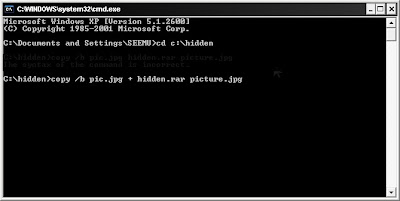
8. That
creates a picture that looks same as pic.jpg in HIDDEN folder.
This picture.jpg contains all your files.
To get your
rar file, just change the extension
.jpg of picture.jpg to
.rar , and open it.
To hide, change the extension back to
.jpg


